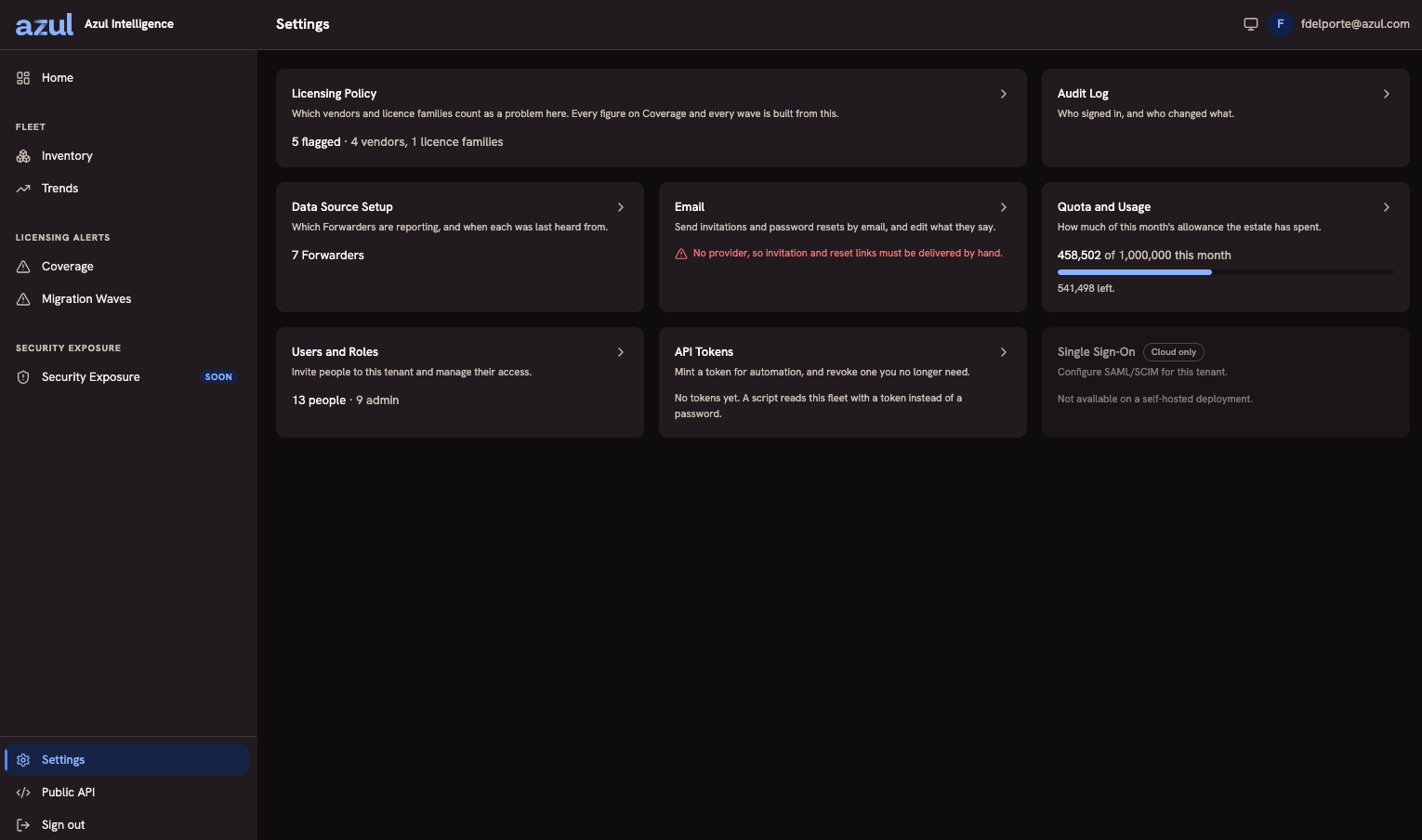
Settings Overview
Settings is the index of everything an Admin administers. Each card states what its area is for and summarises its current state, so the screen doubles as a status page: how many Forwarders are reporting, how much of this month’s allowance the estate has spent, whether email is configured at all.
Admins see every area. Members see their own API tokens, the quota and usage figures, the exclusion groups (read-only), and the Single Sign-On card, and nothing else on this screen.
| Area | What it covers |
|---|---|
Exclusion Groups |
Installations that are known and stay, and why, so new waves leave them out. Every member can read them; only an Admin changes them. See Exclusion Groups. |
Audit Log |
Who signed in, and who changed what. Admin-only, and the one area Members cannot reach at all. See Audit Log. |
Data Source Setup |
Which Forwarders are reporting, when each was last heard from, and every operation on one: reveal or reissue its key, edit its tags, rename, disable, enable, delete. See Connecting Your Data Sources. |
Vulnerability Data |
The vulnerability dataset that Security Exposure judges your installations against: what is loaded, the folder it is read from, upload, and rollback. See Vulnerability Data. |
Which email provider sends invitations and password resets, a test send, and the message texts. The card states plainly when no provider is configured, because that changes how invitations reach people. See Email. |
|
Quota and Usage |
How much of this month’s ingestion allowance your estate has spent, and what remains. See Quota and Usage. |
Users and Roles |
Invite people to this tenant and manage their access. See Users and Roles. |
API Tokens |
Mint a token for automation, and revoke one you no longer need. See API Tokens. |
Single Sign-On |
Marked Cloud only. Intelligence On-Premises authenticates every account itself. |
Each area also carries the index beside it as a rail, so you can move between them without coming back here.
Exclusion Groups
Some installations are known and stay: an appliance licensed through its vendor, or a certified stack. An Admin records that once as an exclusion group, which has a name, a reason, and conditions written in the same condition builder that wave filters use. A group needs at least one condition or tag, and no two groups may share a name.
-
Matching installations are left out of every new wave, including waves made by schedules, at installation granularity: excluding one path leaves the rest of the machine counted.
-
Coverage and its report leave them out while Leave out excluded installations is ticked, which it is by default. The inventory and Trends count them like any other installation.
-
The match is live, so an installation that appears later and matches is excluded too.
-
Waves that already exist are never rewritten.
-
The inventory marks excluded installations with the name of the group, and the marker links here.
-
New wave and New schedule show a notice that reads "N installations on M machines are excluded by K exclusion groups — don’t forget them" and links here. It informs and never blocks.
Every member can open the page and read the groups. Only an Admin can add, change, or remove one, and each change is recorded in the audit log. See Licensing Alerts for waves.
Vulnerability Data
Security Exposure needs a vulnerability dataset: the Critical Patch Update release data and the CISA Known Exploited Vulnerabilities catalog, packaged as a zip. This card shows what is loaded and offers three ways to get a dataset in. See Security Exposure.
-
Upload. An Admin uploads the zip of up to 50 MB. The upload is a dry run first, showing the checks, the difference from the loaded dataset, and the effect on your fleet. Applying it is a second step bound to the reviewed checksum.
-
Folder. Your installation scans the folder named by
VULN_DATA_DIRon start, hourly, and on Check now, and activates the newest valid zip. Copy a zip into the folder by whatever means suits your network. -
Download. Only when the Operator sets
VULN_DATA_METADATA_URL, your installation checks that address hourly and downloads a newer dataset. By default nothing is downloaded.
The card lists the active and previous dataset and any file that was refused with its reason. An Admin can roll back to the previous dataset. Uploads and rollbacks are recorded in the audit log, and the card is flagged when no dataset is loaded or a download check failed.
What Is Configured Here Rather Than on the Host
Most of the deployment is the Operator’s, set in the configuration file and applied at restart. Four things are chosen or edited in the web interface:
-
The email provider and its messages, selected from the transports the Operator configured. The transport itself, with its relay address and credentials, is set in the environment. See Email.
-
Exclusion groups, because they are an organization’s commercial decision rather than a deployment fact.
-
The vulnerability dataset, which an Admin can load without access to the host.
-
Tags, because they are data rather than configuration. Nothing names them in any file.
See Configuration Options for everything that is the Operator’s.