Licensing Alerts
Licensing Alerts in Azul Intelligence On-Premises turns the inventory into work. Coverage shows you how much of your estate runs a given vendor, release, or license, and Migration Waves is where that becomes remediation somebody has been handed.
The two are tabs of one screen, because they answer two halves of one question: what is out there, and what is being done about it.
Admins and Members both use everything on this page, including creating a wave and a schedule. Only writing exclusion groups is reserved for Admins, because a group changes what every new wave contains.
You Decide What Counts, Wave by Wave
Your installation identifies which vendor each installation comes from and which license family it falls under. Those are facts about the binary. Whether they are a problem is a commercial judgement, so there is no tenant-wide setting that decides it.
Coverage takes a plain filter that you set on the screen, and each wave carries its own conditions, written by whoever makes it: Oracle Java 8 in one data center, or a standardization wave from one non-Azul distribution to Azul. A wave is exactly what its filter says, and the same conditions decide, when it closes, whether a machine is still flagged.
Which license each installation falls under is derived per observation. See The License Column.
Exclusion groups
Some installations are not going anywhere: an appliance licensed through its vendor, a certified stack. You say so once, under Settings > Exclusion Groups, with a named group that has a reason and conditions written in the same builder a wave filter uses.
The installations a group matches leave every new wave, whether made by hand, previewed, or made by a schedule. Coverage and its PDF leave them out too while Coverage’s Leave out excluded installations box is ticked, which it is by default. The inventory and Trends count them like any other installation. Matching is live, so an installation that appears later and matches is excluded too, and it works per installation: excluding one path leaves the rest of the machine in scope.
An exclusion is never silent. The inventory keeps the excluded installations, marked with the group’s name, and New wave and New schedule show a notice along the lines of "N installations on M machines are excluded by K exclusion groups", with a link to the groups. It informs and never blocks, and it does not appear when nothing is excluded.
Waves that already exist are not rewritten: a wave’s outcome is judged against its own conditions, so adding a group in the middle of a wave does not turn its machines clean. Creating, changing, and deleting a group is Admin-only and audited. Everybody can open the page and read the groups.
Coverage
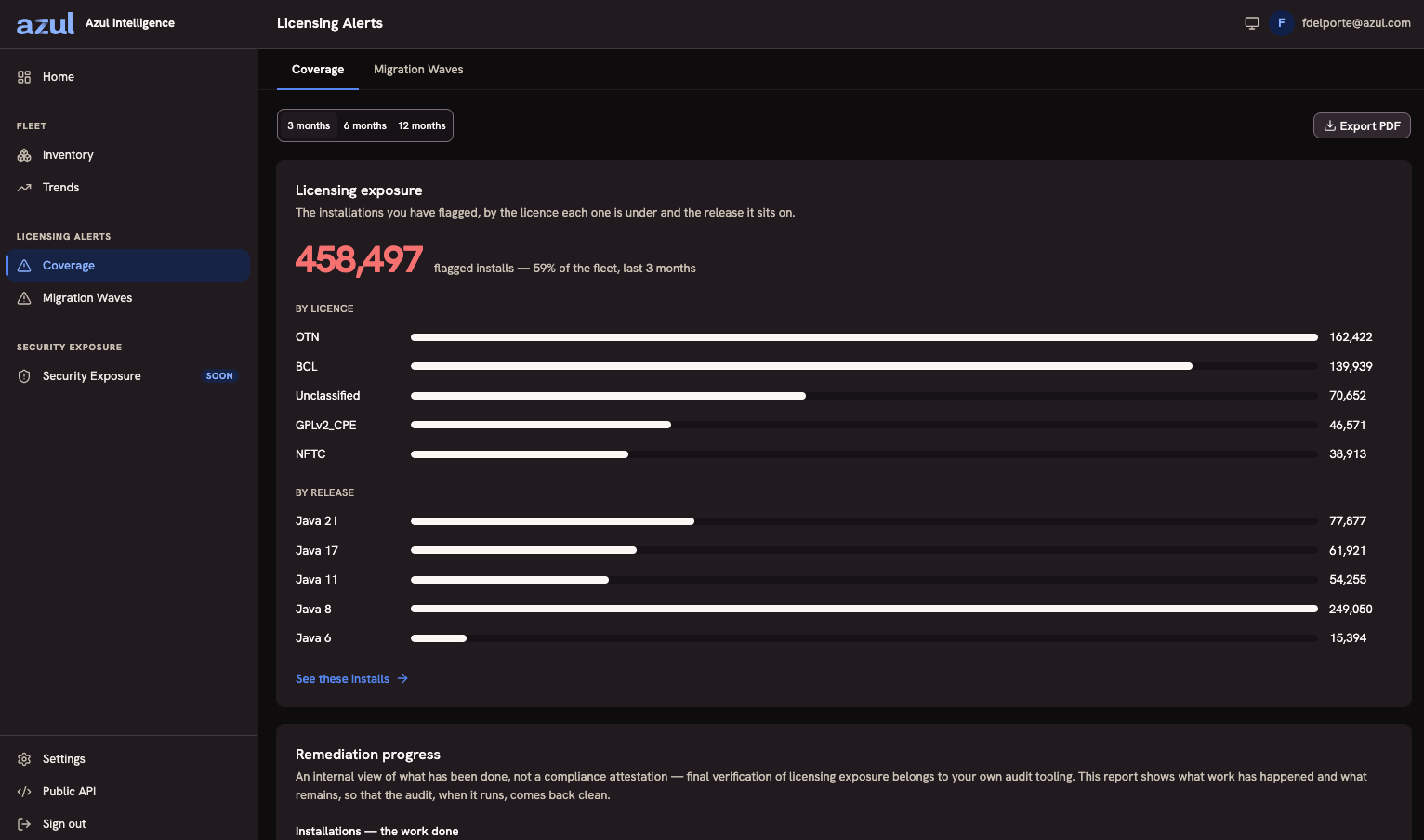
Coverage is the overview of your estate, and reads from top to bottom:
-
A filter with three fields, vendor, Java release, and license, each taking any number of values offered from your own estate, and the Leave out excluded installations box. Values of one field mean any of them, and different fields must all hold. Nothing is pre-selected, so without a filter every figure describes the whole fleet for the period. The filter lives in the address, so a copied link reproduces the view.
-
Java by version and Java by vendor, how your installations distribute across releases and vendors.
-
The count of installations the filter selects, its share of the fleet over the window you chose, and how they split by license. See these installs opens the inventory filtered to that population, which is where a figure becomes a list of hosts.
-
Remediation progress, what has been done and what remains.
Remediation progress counts in two units:
-
Machines: in scope, in progress, confirmed clean, still flagged, and not reported.
-
Waves: in scope, in progress, successful, unsuccessful, and unresolved.
These are figures about waves somebody made, not about your estate. Before anybody makes one they are all zero, which is the honest answer: the estate itself is what the figures above them report.
The report says on its face that it is an internal progress view rather than a compliance attestation. Final verification belongs to your own audit tooling.
Exporting the report
Export PDF opens the report as its own page, outside the application chrome. Its Print / Save as PDF button hands the page to your browser’s print dialog, and the page is titled licensing-status-report-<YYYY-MM-DD> so a folder of saved reports sorts by day. The browser has the last word on the file name.
-
The report is produced in your browser from figures the application already holds, so an installation with all outbound access blocked can still produce one.
-
It uses the same queries and the same filter as Coverage, so the document cannot disagree with the screen.
The report carries the period it covers, the filter field by field (or Whole fleet), whether excluded installations were left out or included, the machines split into confirmed clean, still flagged and not reported, and the disclaimer itself, because a printout travels and by the time somebody reads it in a meeting the screen’s caveat is not there. It also states how many months of that period your installation spent at its ingestion allowance, so a reader can see when the product stopped looking. See Quota and Usage. A figure that has not loaded prints as unavailable, never as a zero.
Migration waves
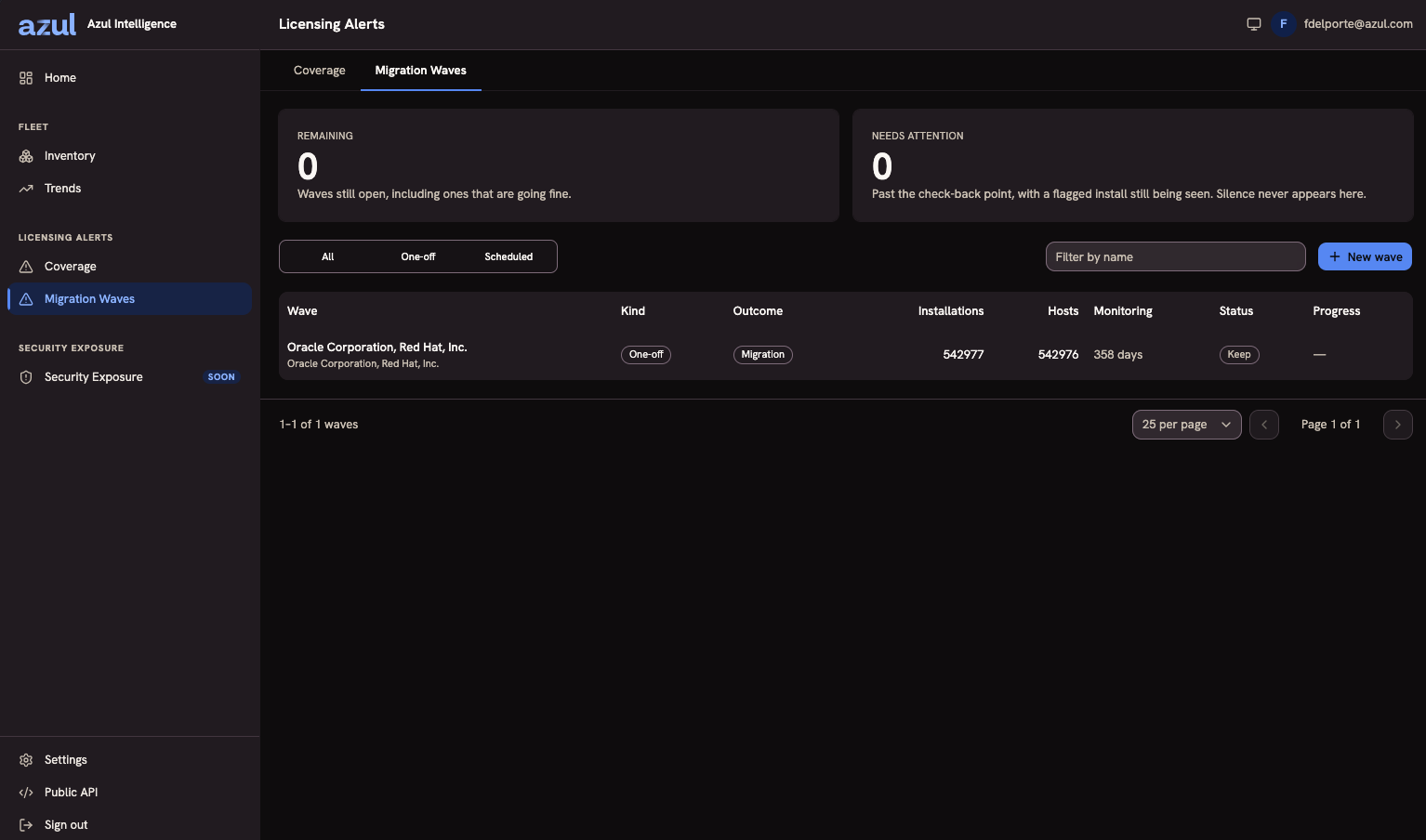
A wave is a batch of machines, frozen at the moment somebody made it, that you hand to whoever does the remediation. The screen has two tabs, Waves and Schedules.
The Waves tab is one list of manual and scheduled waves together. It leads with three counts, In progress, Unsuccessful, and Unresolved. Selecting one filters the list, and the counts themselves do not move with the filter. You can also filter by origin (all, manual, or one schedule) and status, and search by name. The filters live in the address, so a filtered list survives a reload and can be pasted into a ticket.
| Column | What it tells you |
|---|---|
Wave |
Its name, with what it covers underneath. You may name a wave; unnamed, it is named after what it covers. |
Origin |
Manual, or the name of the schedule that made it, linked to that schedule. This is the column that tells a reader whether another wave like this one will appear without anybody doing something. |
Machines |
How many distinct machines the wave covers, as frozen when it was created. |
Window |
The watch window of the wave. |
Status |
In progress, Finalizing, Successful, Unsuccessful, or Unresolved. See A wave is watched, then given an outcome. |
Progress |
How many of the machines are confirmed clean, and how many have reported. |
Creating a wave
New wave builds one from a filter over the installations, excluded ones left out. The form starts empty. The filter has two parts:
-
Conditions, one row per field. The fields are vendor, release, license, host, and install path. A field already in use is not offered again, and the rows narrow each other.
-
Vendor, release, and license take is or is not with one or more values: is matches any of them, so "Java 8 or 11" is one row, and is not matches none of them. Host and install path take contains or does not contain with one value.
-
Tags are written
key=value, or a barekeyto match any value. Values of one key widen it and different keys narrow each other:AppEnv=dev1,AppEnv=dev2, anddept=financemean dev1 or dev2, in finance.
A filter needs at least one condition or tag, because a wave of every installation is never the batch anybody means to hand over. A condition that pairs a field with an operator it does not take is refused with a message naming the problem, rather than dropped.
You can set a watch period between 1 and 365 days; the default is 30. A wave is also given an earliest observation a member may rest on, which defaults to a fortnight back, so a wave covers machines seen recently rather than everything ever observed.
You see what the filter currently matches before you commit. Creating the wave freezes the machines it matched as its members, and keeps the installations that matched on them as the record of what was handed over. The filter is kept with the wave, so a closed wave can still say what it was a wave of. A new matching installation on a machine already in the wave counts, because the wave judges the machine: it keeps that machine still flagged. Machines that match only afterwards belong to whatever wave is made next. A filter that matches nothing does not make a wave.
Creating a wave is the handoff. There is no separate start, because a wave that exists and has not been given to anybody is just a list.
Migration or Uninstall
A wave is typed once, when it is created, and the type is frozen with the membership.
-
Uninstall where every member had been watched by an Agent for at least six months and no member has run in the last six months. Nobody has run these installations; they can go.
-
Migration otherwise, which covers a wave with no Agent history, a wave whose monitoring is too recent to conclude anything from, and a wave with a member that ran recently.
The six months are the default of LICENSING_UNINSTALL_CONFIDENCE_MONTHS. See Configuration Options.
A wave with mixed history is typed Migration and is never split per member: a wave is the unit somebody is handed, and half a wave is not one. The type does not drift afterwards.
A wave is watched, then given an outcome
You do not close a wave. Your installation does, from the observations it received.
-
In progress. The wave is watched for its watch period, counted from the moment it was made. The end is stored on the wave, so changing the default later does not move it.
-
Finalizing. After the watch ends, the wave waits for the next ingestion pass to complete, so that a scan dated inside the watch and delivered before that pass still counts. Data delivered after it does not. While ingestion is paused, for example when the allowance is spent, the wave is closed with its state at the end of the watch.
-
Closed. That pass records the outcome once, from the observations inside the watch window, and the wave is closed.
An outcome is never changed afterwards. A flagged installation turning up on one of those machines next month is a flagged installation for the next wave, not a rewrite of this one.
Machines, not installations
A wave counts machines. A host with two flagged JDKs is one machine and one thing somebody fixes. Each machine is read scan by scan, applying the wave’s own conditions to what each scan found. The tags and the earliest observation only chose the members, so a machine already in the wave does not leave it by losing a tag:
| The scan or sighting | The machine |
|---|---|
A scan in which the wave’s conditions match something, or an Agent run of a JVM they match |
Still flagged |
A scan, with nothing flagged |
Confirmed clean |
An Agent run of an unflagged JVM |
Unchanged |
Every machine starts flagged, because that is why it is in the wave, and its state at the end is that of its newest scan or flagged sighting. Scans are ordered by the date they carry, then by when the Forwarder delivered them, so a rescan on the same day replaces the scan before it. A machine with no scan and no flagged sighting inside the watch is not reported, and never counts as clean. An Agent run is not a scan: it reports one JVM, so a host running one distribution every day does not clear a flagged JDK sitting idle beside it. A flagged JDK found at a new path, or reinstalled after going clean, is flagged; a vendor swap at the same path reads clean.
| Outcome | When |
|---|---|
Successful |
Every machine is confirmed clean. |
Unsuccessful |
At least one machine is still flagged. |
Unresolved |
No machine is still flagged, and at least one is not reported. |
Unsuccessful wins over Unresolved, because a flagged observation is a stronger claim than silence. Silence is not proof: a decommissioned host, a Forwarder that stopped, and a spent ingestion allowance look the same from here, and none is evidence that anybody removed anything. Unresolved says exactly that rather than guessing either way. Where the installation spent part of the period at its ingestion allowance, the status report says so.
The tally and the movement log
Alongside its outcome, a wave carries a tally of machines: clean, flagged, and not reported, which sum to the machines in the wave. It also counts the machines that went clean and the machines that came back, at least once each. A machine that flapped counts once in each.
Every change is a movement, went clean or came back, dated by the scan or sighting that showed it, and the wave screen lists them. While a wave is in progress these are read from the dataset when the screen opens. Once a wave closes, the figures stored with its outcome stand.
The progress line reports how many machines have reported before it reports how many are still flagged, so a zero is never read before it is known how much was observed.
The wave screen lists the wave’s machines, one group per machine. The host and the machine’s state appear once for the group, and each installation handed over on that machine has its own row: its path, what it was selected as (the vendor and version it had when the wave was made), its historical license, and when it was last seen. Later observations never rewrite these values. A machine that is still flagged says how many installations hold it, as "Held by N installations", and names the first five on hover. These are the installations the wave’s conditions match on that machine, including one that appeared after the wave was made. A wave in progress names them as of now; a closed wave keeps the ones recorded when it closed.
The movements of a wave, each machine going clean or coming back with its date, are collapsed under Movements below the machines, with their count beside the title.
Scheduled waves
A schedule holds a filter, a name prefix, an interval, a lookback, and a watch period. It creates one wave every interval, covering the period just elapsed, and each wave is named after the schedule with the date appended. A schedule is off until you set one up, and it can be paused, resumed, edited, and deleted from its own page, which also lists the waves it made.
Each wave a schedule makes is dated, frozen, and behaves exactly like one you made by hand. A schedule is not itself a wave: one wave re-evaluated on a timer is a live view, and a live view cannot be handed to anybody as work, because its contents change under them and "is this done" has no answer.
Three rules govern the timing:
-
The lookback may never exceed the interval. Two consecutive windows would overlap, and an installation in the overlap would belong to two waves at once. A lookback equal to the interval tiles the timeline exactly and is the default.
-
A shorter lookback is allowed, since a Monday review of the last two days is a legitimate thing to want. The schedule reports how many days no wave will cover, even when that is zero.
-
A new schedule makes its first wave at the end of its first interval, not on creation. A schedule that missed several intervals because the deployment was down resumes rather than emitting a backlog of waves covering periods nobody is going to work through. A schedule that finds nothing in its window makes no wave and keeps going.
Like a wave, a schedule’s form starts empty, and its filter follows the same rules.
The recipe
A wave generates a plain-text, ordered action list, one section per host, built from its own frozen membership. Each installation names what it was selected as, so whoever executes the recipe can tell when the JDK at that path is no longer the one the wave was made for. Its last step is always to re-scan the host.
The recipe is text for a person to follow, and nothing reports back. The effect is observed through the next scan or Agent run, which is what the outcome reads.
Deleting a wave
Deleting removes the wave, its frozen membership, and its movement log, and takes its machines out of the progress figures. Your estate is untouched.
Deletion exists where an outcome is deliberately not undoable: a plan can simply be wrong, with the wrong filter, for the wrong week, or made twice by accident.
Deleting a schedule leaves the waves it already made, which are frozen work somebody may be part-way through.
What is recorded
Creating, changing, or deleting an exclusion group is an audit-log entry, because it changes what every new wave contains. Creating a wave or a schedule, deleting one, and generating a recipe are the work itself and are not. See Audit Log.
Getting the data out
The integration API covers exclusion groups, waves with their machines, schedules, recipes, and the progress figures, with the same reads and writes this screen offers. See The Integration API.