The Integration API
Table of Contents
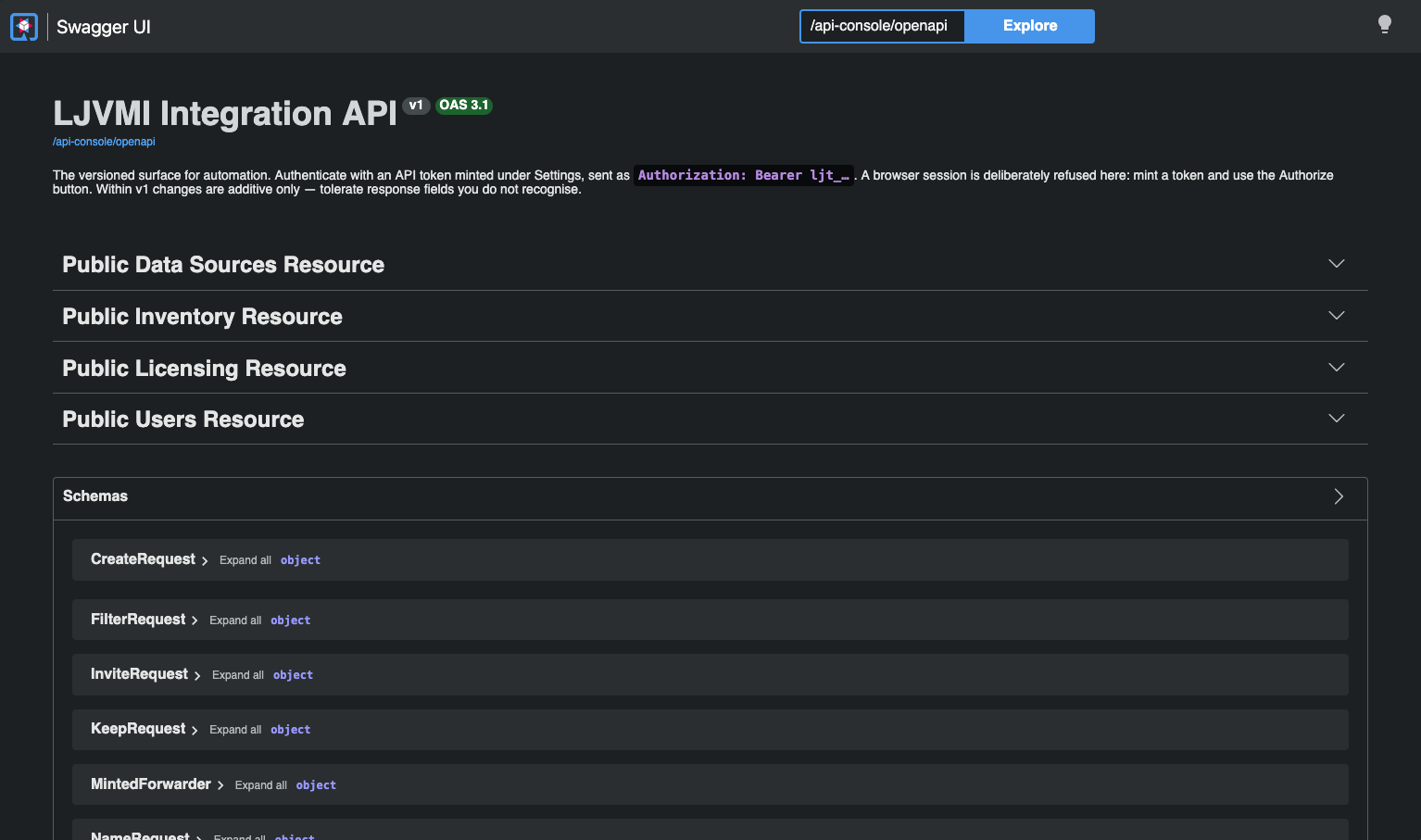
Azul Intelligence On-Premises serves a versioned REST API for automation, with an interactive console over the same contract so you can read the surface and try a call without installing anything.
Reach it from Public API in the navigation, which opens it in a new tab. Every signed-in user can open the console, whatever their role: operations that need an Admin are listed for everybody, marked Admin only, and a Member’s token gets a 403 from them.
Two Surfaces, and Why It Matters
The web interface and your automation do not call the same endpoints, and the separation is deliberate.
| Surface | What it is for |
|---|---|
The interactive surface |
Everything the web interface calls, authenticated by your session cookie. It changes shape whenever the screen it serves does, so it is not a contract to build on. |
The integration surface |
A versioned contract for automation, authenticated only by a bearer API token. Within a version, changes are additive only, and the surface is described by a machine-readable document the build checks against a committed copy. |
An internal endpoint that acquires an external consumer is an endpoint that can no longer be changed, and the way that happens is by nobody having drawn the line. This is the line.
Each surface accepts only its own credential. A session is refused on the integration surface, and a token is refused on the interactive one. That keeps a browser off a write-capable API entirely, and it is what makes the rate limit unavoidable rather than escapable by scripting a login.
The correspondence between the two is checked mechanically, so an operation added to a screen cannot silently fail to appear here.
What It Covers
| Area | Coverage |
|---|---|
Inventory |
The records, one per machine with the installations it holds, one record’s detail, its runs, its activity, the summary, and trends. The summary and trends take the same vendor, release, and license filter as Coverage and Trends. Read-only on every surface, because the inventory is a reduction over the observations your estate delivered and there is nothing to write. See Fleet Inventory. |
Licensing Alerts |
Exclusion groups and their summary, waves with their machines, handed-over installations, and movements, the values a wave filter can take, wave previews, recipes, progress, and schedules. Read and write, with writes to exclusion groups reserved for Admins. A wave’s own read also carries |
Data sources |
Forwarder registration, tags, renaming, reissuing a key, disabling, enabling, and deleting. See Connecting Your Data Sources. |
Users |
Listing members, inviting, and the membership operations: remove, change role, suspend, unsuspend, reset password. See Users and Roles. |
Security Exposure |
The overview, one Java major release, the vulnerabilities of a build, and the installations of chosen builds. The recipe downloads are files for a person and are not part of the API. See Security Exposure. |
Vulnerability data |
Status, check, upload, and rollback of the vulnerability dataset, for an Admin’s token. See Security Exposure. |
The audit log is read in the web interface by an Admin. See Audit Log.
List endpoints carry the same pagination and the same filters as their equivalents in the web interface, so a query you can express on a screen you can express here.
API Tokens
Mint a token under Settings > API Tokens. Minting is available on the interactive surface only, and deliberately so: a token that could mint another token would renew itself past whatever expiry you set, and the expiry is most of what makes these safe.
Mint one as any member. Six properties are worth knowing before you build on one:
-
A token carries no authority of its own. Its role is read from its owner’s live membership on every request, so demoting, suspending, or removing the owner revokes the token without anybody having to remember to.
-
It enforces the same role boundary as the web interface. A Member’s token cannot perform an Admin-only action, and no token can act outside its own tenant.
-
It is not a password, and it survives its owner rotating theirs.
-
The secret is shown once. Store it where you store your other production secrets.
-
Every token expires. The lifetime is 90 days unless the creator asks for another, and 365 days at most. A longer lifetime is refused rather than shortened, so an integration built for five years fails at the request instead of silently a year later. There is no unlimited option, because a credential that never expires on a box nobody logs into is one nobody rotates. An operator changes the two figures with
LJVMI_AUTH_API_TOKEN_DEFAULT_DAYSandLJVMI_AUTH_API_TOKEN_MAX_DAYS. -
Only the owner sees and revokes a token. Settings lists your own tokens and nobody else’s, an Admin included. To stop a departing engineer’s automation, suspend their membership, which ends every token of theirs at once and keeps their history, or remove them, which deletes the tokens.
Send a token as a bearer credential in the Authorization header. The console’s Authorize button does the same thing for a call you try there; paste the token alone, without Bearer.
 curl -H "Authorization: Bearer <token>" \
     https://<your-host>/api/public/v1/inventory?limit=100
Limits
Per-tenant limits keep fleet-scale automation from degrading interactive use, and there are two of them, because a request rate alone is not enough. A handful of simultaneous full-fleet reads is a trivial request rate and still occupies the shared query engine while a person waits, so concurrent dataset queries are bounded as well.
| Variable | Default | What it bounds |
|---|---|---|
|
600 |
Requests per tenant per minute, token traffic only. |
|
2 |
Concurrent dataset-querying requests per tenant. Endpoints that do not touch the dataset, such as users and data sources, are not counted. |
Interactive sessions are never limited. They are what the limits exist to protect.
A refusal is a 429 with a Retry-After header. The RateLimit-Limit, RateLimit-Remaining, and RateLimit-Reset headers accompany every allowed response too, so a client can pace itself instead of discovering the limit by hitting it. A request refused by the concurrency cap fails immediately instead of queueing, so retry after a pause. Both counters apply per running instance.
Both kinds of refusal are published as metrics, distinguished by which limit was hit, because a rate refusal and a concurrency refusal call for different fixes. See Monitoring and Health.